

Lifecycle
Every Portent object moves through a simple lifecycle.
The lifecycle is intentionally small. It is not meant to replace project management, task workflow, or a team's operational status model. It answers a more basic knowledge-base question: should this object still be treated as active knowledge?
The information lifecycle answers the question: should this object still be active?
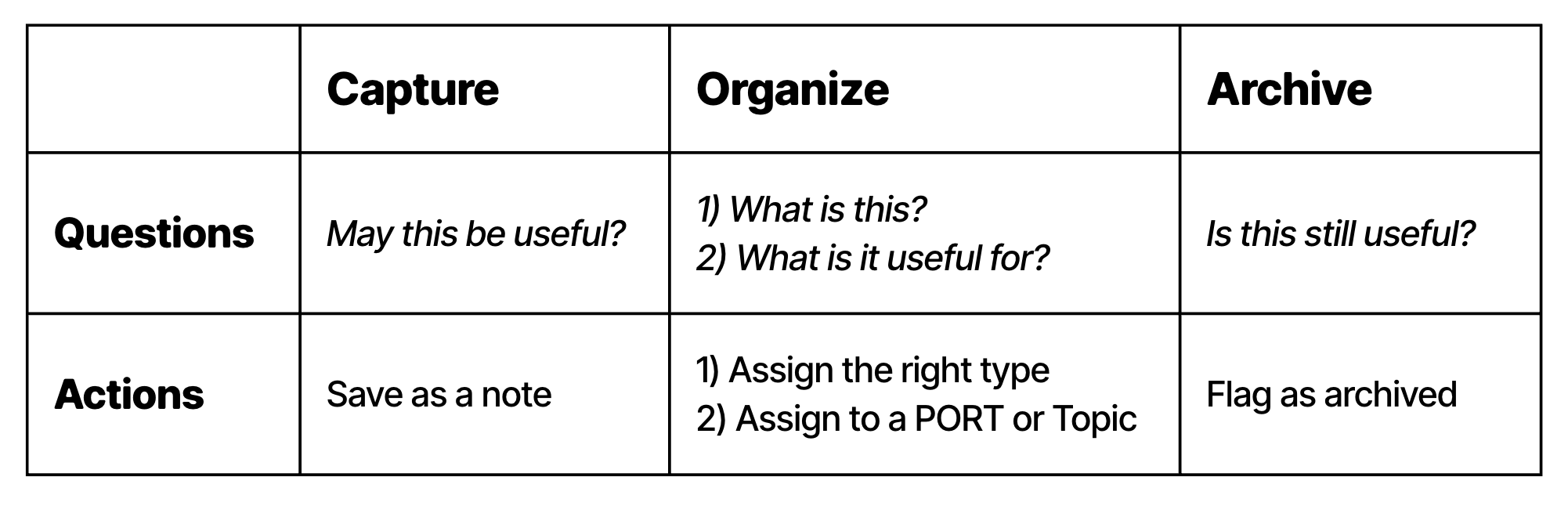
The Portent lifecycle moves from capture to organize to archive.
Portent defines three lifecycle steps:
- Capture
- Organize
- Archive
A knowledge base is not useful because everything is stored. It is useful because the right things keep appearing in the right views.
The lifecycle controls that visibility.
Captured objects need attention. Organized objects are ready to be used. Archived objects remain part of memory, but should stop appearing in active views unless explicitly requested.
Capture
A captured object has been recorded, but is not yet actionable.
It can start as a thought, pasted link, rough meeting note, image, transcript, draft, task, or unprocessed document. At this stage, the important thing is not to lose it.
Captured items can live in an inbox, daily note, scratchpad, import queue, or any other temporary surface.
Captured objects may be missing:
- a clear title
- a type
- a primary relationship
- enough context to know why they matter
The captured state is allowed to be messy. Its job is to protect speed.
Capture optimistically. Save the link, meeting note, quote, idea, or draft before deciding whether it deserves a permanent place in the graph.
Organize
An object becomes organized when you can answer two questions:
- What is this?
- What will this be useful for?
The first question assigns type. The second assigns relationships.
In practice, organizing usually means:
- giving the object a clear title
- assigning a Portent type
- assigning a primary relationship such as
belongs_to, when there is a clear main context - assigning secondary relationships such as
related_to, when they explain future use
This is the moment where a raw capture turns into part of the graph.
Organize pessimistically. If a captured item cannot attach to a project, responsibility, operation, or topic, it may not be worth keeping.
An organized object has enough structure to be retrieved later.
It can leave the inbox because its future retrieval path is no longer accidental.
Organized does not mean complete, polished, or final. A project can still be active. A note can still be expanded. A topic can still grow. The point is that the object now has enough semantic structure to participate in views, filters, navigation, and graph traversal.
Archive
An archived object has completed its purpose or is no longer useful in active work.
Archived objects should remain available for search, history, audit, and reference, but they should not appear in ordinary active views by default.
Examples:
- a completed project that no longer needs active attention
- an event that should remain in history but not in current dashboards
- a note that has been superseded by a better note
- an operation that is no longer performed
- a task that has already been handled elsewhere
Archiving is different from deletion. Deletion says the object should not be part of memory. Archiving says the object should no longer compete for attention.
Implementations can represent lifecycle state however they prefer. A Markdown implementation might use:
---
type: Event
state: organized
belongs_to: "[[Launch Portent v0.1]]"
related_to:
  - "[[Portent lifecycle]]"
---
Tools may choose different labels or omit the field when an object is organized by default. The important behavior is the distinction:
- captured objects need triage
- organized objects appear in normal views
- archived objects are hidden from active views unless requested